08. Data Logging & Telemetry
1. Introduction to Data Logging
In the MineTwin development environment, data logging is more than just printing to a screen; it is the foundation of performance tracking, identifying bottlenecks, and enabling data-driven decision-making.
-
Professional Telemetry: It provides robust, professional telemetry for the application, allowing you to capture exactly what is happening under the hood during complex operations.
-
Continuous Tracking: It enables developers to reliably track specific model calculations—such as capturing a
LogRecordfor "DistanceTraveled"—across multi-day scenario simulations.
2. Basic Data Logging to Console
Let’s do it live! We want to add some basic logging to the app to see what is happening. We can do this by opening the Model Java file and adding some code.
Navigate to: bundles > simulation > src > simulation > ~Model.java
2.1. The onDayEnded() Hook
We are going to use a convenient function of the model called onDayEnded(). This will allow us to complete an action each time a day ends in the model.
|
Other Timing Options
There are many other such useful functions like |
Add the following code to your model:
@Override
protected void onDayEnded() {
    super.onDayEnded();

    // Log the current simulated date
    System.out.println("onDayEnded " + engine().timeToDate(engine().time()));

    // Log distance per truck
    getTrucks().forEach(t -> {
        System.out.println(t.getName() + "\t" + t.getFeature(GraphAgentFeature.class).getDistanceTraveled() / kmToPx());
    });
}
This code will, at the end of each day, print out the truck’s name and its total distance traveled.
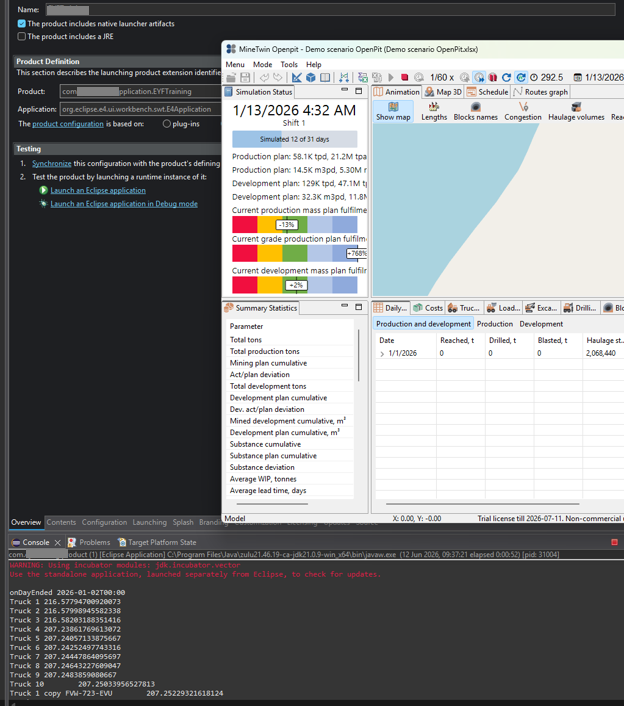
We can now run the model with a Standard Library scenario to test the logging to the console.
|
This shows the total kilometers each truck has traveled from the start of the simulation until when the log is printed. |
2.2. Tracking Daily Changes with HashMaps
To see how versatile the code is and how much we can customize it, let’s change that to show the distance per day rather than the overall total.
To do this, we can do a couple of calculations where we store the total distance from yesterday, and at the end of the day when we have a new total distance, we subtract yesterday’s value to get the distance traveled today.
First, we need a way to store previous values. A convenient way to do this in Java is something called a HashMap. A map is a collection of data where each value is "mapped" to a key so that you can retrieve the value later by calling that key.
Create the hashmap at the top of your class to store previous days' values:
private Map<Truck, Double> lastDistanceTraveled = new HashMap<>();|
Remember your Imports!
Whenever you use a new class, you must import it. Remember the required imports for Map, HashMap, and the Truck agent.
|
Then, we need to update our logging code inside onDayEnded() to use the map, calculate the difference, and then save the updated total value back into the map for the next day:
getTrucks().forEach(t -> {
    double lastOdometerValue = lastDistanceTraveled.getOrDefault(t, 0.0);
    double currentValue = t.getFeature(GraphAgentFeature.class).getDistanceTraveled() / kmToPx();

    System.out.println(t.getName() + "\t" + (currentValue - lastOdometerValue));

    // Update the map for tomorrow's calculation
    lastDistanceTraveled.put(t, currentValue);
});
If we run the standard scenario again, we will see the log values printed in the console are now per day.
2.3. Console Logging Exercises
These exercises are designed to take roughly the same amount of time. You will need to log to the console and implement logic in the onDayEnded() method (or similar) using Maps to track daily changes.
| Exercise | Task Description |
|---|---|
Option 1: Truck Odometer |
Log the exact distance each truck travels every shift. Log it at the beginning of a shift. |
Option 2: Excavator Utilization % |
Log the total utilization percentage for the excavator fleet. Update it daily. |
Option 3: Hauler Material Moved |
Log the actual volume of material moved by specific Haulage Trucks every day. |
Option 4: Tons Mined per Block |
Log how much material was extracted from specific mine blocks per shift. |
Option 5: Excavator Odometer |
Log the exact distance each excavator travels in total. Update it at the beginning of a shift. |
Option 6: Production vs Waste (Hard) |
Log the total tons of production vs waste dumped each day. |
✅ Exercise Answers
import com.amalgamasimulation.minetwin.core.Shift;
import com.amalgamasimulation.minetwin.core.features.GraphAgentFeature;

private Map<Truck, Double> lastDistanceTraveled = new HashMap<>();

@Override
protected void onShiftBegin(Shift shift) {
    super.onShiftBegin(shift);
	System.out.println("onShiftBegin " + engine().timeToDate(engine().time()));
	getTrucks().forEach(t -> {
		double lastOdometerValue = lastDistanceTraveled.getOrDefault(t, 0.0);
		double currentValue = t.getFeature(GraphAgentFeature.class).getDistanceTraveled() / kmToPx();
		System.out.println( t.getName() + "\t" + (currentValue - lastOdometerValue));
		lastDistanceTraveled.put(t, currentValue);
	});
}import com.amalgamasimulation.minetwin.core.features.EquipmentStatsFeature;
@Override
protected void onDayEnded() {
super.onDayEnded();
System.out.println("onDayEnded " + engine().timeToDate(engine().time()));
getExcavators().forEach(t -> {
double currentValue = t.getFeature(EquipmentStatsFeature.class).utilization();
System.out.println( t.getName() + "\t" + currentValue);
});
}private Map<Truck, Double> lastTotalAmount = new HashMap<>();
@Override
protected void onDayEnded() {
super.onDayEnded();
System.out.println("onDayEnded " + engine().timeToDate(engine().time()));
getTrucks().forEach(t -> {
double lastAmountValue = lastTotalAmount.getOrDefault(t, 0.0);
double currentValue = t.getBunker().getTotalOutflowAmount();
System.out.println( t.getName() + "\t" + (currentValue - lastAmountValue));
lastTotalAmount.put(t, currentValue);
});
}import com.amalgamasimulation.minetwin.core.Shift;
import com.amalgamasimulation.minetwin.openpit.simulation.block.Block;
private Map<Block, Double> lastTonsMined = new HashMap<>();
@Override
protected void onShiftBegin(Shift shift) {
super.onShiftBegin(shift);
System.out.println("onShiftBegin " + engine().timeToDate(engine().time()));
getBlocks().forEach(t -> {
double lastTonsValue = lastTonsMined.getOrDefault(t, 0.0);
double currentValue = (t.getBunker().getTotalOutflowAmount() / 1000) ;
System.out.println( t.getName() + "\t" + (currentValue - lastTonsValue));
lastTonsMined.put(t, currentValue);
});
}import com.amalgamasimulation.minetwin.core.Shift;
import com.amalgamasimulation.minetwin.core.features.GraphAgentFeature;
@Override
protected void onShiftBegin(Shift shift) {
super.onShiftBegin(shift);
System.out.println("onShiftBegin " + engine().timeToDate(engine().time()));
getExcavators().forEach(t -> {
double currentValue = t.getFeature(GraphAgentFeature.class).getDistanceTraveled() / kmToPx();
System.out.println( t.getName() + "\t" + currentValue);
});
}import java.util.stream.Collectors;
import com.amalgamasimulation.minetwin.core.OreType;
import com.amalgamasimulation.minetwin.openpit.simulation.DumpArea;
private Map<DumpArea, Double> lastTonsDumped = new HashMap<>();
@Override
protected void onDayEnded() {
super.onDayEnded();
System.out.println("onDayEnded " + engine().timeToDate(engine().time()));
double totalProductionTonsToday = 0.0;
double totalDevelopmentTonsToday = 0.0;
// 2. Use a traditional for-loop instead of .forEach()
for (DumpArea t : getDumpAreas()) {
// Get the previous day's total (using the correct map name)
double lastTonsValue = lastTonsDumped.getOrDefault(t, 0.0);
// Calculate the current cumulative value in tons
double currentValue = (t.getBunker().getTotalInflowAmount() / 1000.0);
// Calculate exactly how much was moved TODAY
double tonsToday = currentValue - lastTonsValue;
// Get name of ore type:
String oreNames = t.getAllowedOreTypes().stream()
.map(ore -> ore.getName()) // Extract the name from each OreType
.collect(Collectors.joining(", ")); // Join them with a comma
// 3. Categorize into Production vs Development
if (oreNames.contains("Limestone")) {
totalProductionTonsToday += tonsToday;
} else {
totalDevelopmentTonsToday += tonsToday;
}
System.out.println(t.getName() + " daily tons:\t" + tonsToday);
// Update the map for tomorrow's calculation
lastTonsDumped.put(t, currentValue);
}
// 4. Print the final totals for the day
System.out.println("Total Production Tons Today: " + totalProductionTonsToday);
System.out.println("Total Development Tons Today: " + totalDevelopmentTonsToday);
}|
If you are wondering if it is better to log to the console or to files, file logging is significantly better for large projects. We will cover that in the next section! |
3. Professional File Logging (Data Logging Continued)
We are now going to upgrade from basic console logging to the professional MineTwin Logging Framework, allowing us to log to structured text files.
3.1. Creating the Log Record
MineTwin automatically serializes Java records using specific annotations, rather than forcing you to manually handle file I/O operations.
We use key annotations for this: tag a record with @LogName (for the file name) and its fields with @LogColumnName (for the headers).
Inside your model, add the following record structure:
import com.amalgamasimulation.utils.logging.annotation.LogName;
import com.amalgamasimulation.utils.logging.annotation.LogColumnName;

@LogName("DistanceTraveled")
public record LogRecord(
    @LogColumnName("Truck name") String name,
    @LogColumnName("Traveled distance, km") Double distance
) {}
3.2. Initializing the Logger
Next, we need to initialize the logger in our model. Add the logger as a private variable:
import com.amalgamasimulation.utils.logging.Logger;

private Logger logger;
Now we create the logger and open a logging session inside the Model constructor. Here we specify the location where the log file will be created. Let’s use your Downloads folder:
logger = new Logger();

// For Windows:
logger.openSession("C:\\Users\\<Username>\\Downloads\\logs");

// For Mac:
// logger.openSession("/Users/<Username>/Downloads/logs");
3.3. Executing the Log
Finally, we add the actual log method to our previous function calculating the distances:
logger.log(new LogRecord(t.getName(), (currentValue - lastOdometerValue)));Now we can test it! Simulate your standard scenario again for a few days. You will then find the .txt log files generated inside your specified downloads folder.
|
Why use the Amalgama Logger?
The logger logs live – each time a day ends, the logs are immediately written to the log file. You can test this by running the simulation slowly and repeatedly opening the log file; you will notice the file size grows and new records are added on the fly. This is a super efficient method of logging. Logging live uses very little memory because the application does not have to hold massive amounts of data in memory until the end of the simulation. |
4. Professional Logging Master Exercises
These are the same exercises as before, but now we are going to log directly to files AND we are going to track multiple metrics at once.
| Scenario | Tasks |
|---|---|
Option 1: Truck Distance & Hauler Material |
Log the exact distance each truck travels every shift. AND log the actual volume of material moved by specific Haulage Trucks per shift. (Requirement: Include the shift number). |
Option 2: Excavator Utilization & Distance |
Log the total utilization percentage for the excavator fleet. AND log the exact distance each excavator travels in total. Update both daily. (Requirement: Include the day number). |
Option 3: Tons Mined & Production vs Waste |
Log how much material was extracted from specific mine blocks per shift. AND log the total tons of production vs waste dumped per shift. (Requirement: Include the day number and shift number). |
💡 Developer Hint for Shifts and Days
For Option 3, you need to track partial days. You can use Math.ceil() to round your day numbers up appropriately since shifts represent fractions of a day!
✅ Exercise Answers
import com.amalgamasimulation.minetwin.core.Shift;
import com.amalgamasimulation.minetwin.core.features.GraphAgentFeature;

@LogName("TruckDistanceTraveledPerShift")
public record LogRecord1(
  @LogColumnName("Shift") int shift,
  @LogColumnName("Truck name") String name,
  @LogColumnName("Traveled distance, km") Double distance
) {}
@LogName("TrucksMaterialMovedPerDay")
public record LogRecord2(
  @LogColumnName("Shift") int shift,
  @LogColumnName("Truck name") String name,
  @LogColumnName("Material moved, t") Double amount
) {}

private Map<Truck, Double> lastDistanceTraveled = new HashMap<>();
private Map<Truck, Double> lastTotalAmount = new HashMap<>();


@Override
protected void onShiftBegin(Shift shift) {
    super.onShiftBegin(shift);
	System.out.println("Data Logged at beginning of shift " + engine().timeToDate(engine().time()));
	getTrucks().forEach(t -> {
		//Distance Logging
		double lastOdometerValue = lastDistanceTraveled.getOrDefault(t, 0.0);
		double currentOdometerValue = t.getFeature(GraphAgentFeature.class).getDistanceTraveled() / kmToPx();

		logger.log(new LogRecord1(shift.getShiftIndex(), t.getName(), (currentOdometerValue - lastOdometerValue)));

		lastDistanceTraveled.put(t, currentOdometerValue);

		//Tons Moved Logging
		double lastAmountValue = lastTotalAmount.getOrDefault(t, 0.0);
		double currentAmountValue = t.getBunker().getTotalOutflowAmount();

		logger.log(new LogRecord2(shift.getShiftIndex(), t.getName(), (currentAmountValue - lastAmountValue)));

		lastTotalAmount.put(t, currentAmountValue);
	});
}import com.amalgamasimulation.minetwin.core.features.EquipmentStatsFeature;
import com.amalgamasimulation.minetwin.core.features.GraphAgentFeature;
@LogName("ExcavatorUtilisationPerDay")
public record LogRecord3(
@LogColumnName("Excavator name") String name,
@LogColumnName("Utilisatione, %") Double utilisation
) {}
@LogName("ExcavatorDistanceTraveledPerDay")
public record LogRecord4(
@LogColumnName("Excavator name") String name,
@LogColumnName("Traveled distance, km") Double distance
) {}
@Override
protected void onDayEnded() {
super.onDayEnded();
System.out.println("Data Logged at end of day " + engine().timeToDate(engine().time()));
getExcavators().forEach(t -> {
//Utilisation Logging
double currentUtilisationValue = t.getFeature(EquipmentStatsFeature.class).utilization();
logger.log(new LogRecord3(t.getName(), currentUtilisationValue));
//Distance Logging
double currentDistanceValue = t.getFeature(GraphAgentFeature.class).getDistanceTraveled() / kmToPx();
logger.log(new LogRecord4(t.getName(), currentDistanceValue));
});
}import java.util.stream.Collectors;
import com.amalgamasimulation.minetwin.core.OreType;
import com.amalgamasimulation.minetwin.openpit.simulation.DumpArea;
import com.amalgamasimulation.minetwin.core.Shift;
import com.amalgamasimulation.minetwin.openpit.simulation.block.Block;
@LogName("BlockTonsMinedPerShift")
public record LogRecord5(
@LogColumnName("Day") Double day,
@LogColumnName("Shift") int shift,
@LogColumnName("Block name") String name,
@LogColumnName("Amount mined, t") Double amount
) {}
@LogName("AmountsDumpedPerShift")
public record LogRecord6(
@LogColumnName("Day") Double day,
@LogColumnName("Shift") int shift,
@LogColumnName("Ore Type") String name,
@LogColumnName("Amount, t") Double amount
) {}
private Map<Block, Double> lastTonsMined = new HashMap<>();
private Map<DumpArea, Double> lastTonsDumped = new HashMap<>();
@Override
protected void onShiftBegin(Shift shift) {
super.onShiftBegin(shift);
System.out.println("Data Logged at beginning of shift " + engine().timeToDate(engine().time()));
getBlocks().forEach(t -> {
double lastBlockValue = lastTonsMined.getOrDefault(t, 0.0);
double currentBlockValue = (t.getBunker().getTotalOutflowAmount() / 1000) ;
logger.log(new LogRecord5(Math.floor(engine().time() / engine().day()), shift.getShiftIndex(), t.getName(), (currentBlockValue - lastBlockValue)));
lastTonsMined.put(t, currentBlockValue);
});
double totalProductionTonsToday = 0.0;
double totalDevelopmentTonsToday = 0.0;
for (DumpArea t : getDumpAreas()) {
double lastDumpValue = lastTonsDumped.getOrDefault(t, 0.0);
double currentDumpValue = (t.getBunker().getTotalInflowAmount() / 1000.0);
double tonsToday = currentDumpValue - lastDumpValue;
if (t.getAllowedOreTypes().stream().anyMatch(e -> e.getName().contains("Limestone"))) {
totalProductionTonsToday += tonsToday;
} else {
totalDevelopmentTonsToday += tonsToday;
}
// Update the map for tomorrow's calculation
lastTonsDumped.put(t, currentDumpValue);
}
logger.log(new LogRecord6(Math.ceil(engine().time() / engine().day()), shift.getShiftIndex(), "Production", totalProductionTonsToday));
logger.log(new LogRecord6(Math.ceil(engine().time() / engine().day()), shift.getShiftIndex(), "Development", totalDevelopmentTonsToday));
}4.1. Why this Granularity Matters
While MineTwin already has a lot of excellent summary statistics built-in, adding custom, detailed logs is one of the most important task for any project.
In standard MineTwin, you only see overall totals. If something is off—or different than expected—you don’t know when and why. By leveraging these custom shift logs, we can track metrics hour-by-hour and pinpoint the exact moment utilization starts to decrease.
Open your newly generated logs in Excel to build Pivot charts and analyze your simulation’s true performance!