MineTwin Windows Application Performance with Screen Scaling
Issue description
MineTwin application performance (graphical editor performance in particular) may be reduced on Windows systems where the display scaling is set above 150%.
Solution
To fix the issue, enable the high DPI scaling override:
-
Open the folder where the application in installed.
-
Locate the application executable file.
-
Open the file’s context menu.
-
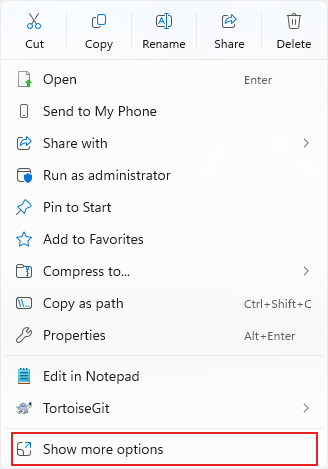
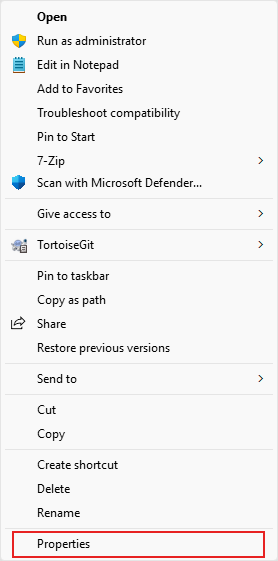
Click 'Properties' menu item. Windows 11 users may need to click 'Show more options' first.
-
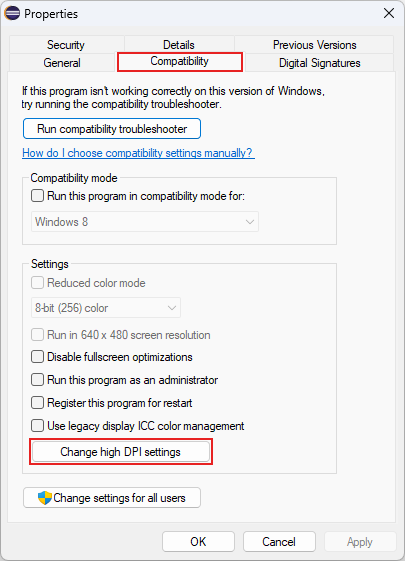
In the 'Properties' window, choose the 'Compatibility' tab.
-
In the 'Compatibility' tab, click the 'Change high DPI settings'.
-
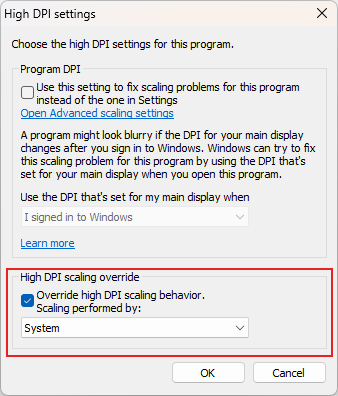
In the High DPI settings window, enable the 'Override high DPI scaling behavior' and choose 'System' from the dropdown list.
-
Click OK. In the 'Properties' window, click OK as well.
-
Restart the Minetwin application.