MineTwin Overview
What is MineTwin?
MineTwin® is a configurable simulation-based decision support tool for underground and open-pit mines. MineTwin uses Amalgama® platform and libraries to provide fast and accurate simulation models of underground and open-pit mines.
MineTwin is intended for the mining companies and consultants, for both once-off projects and ongoing use in regular planning and decision support.
What are the typical use cases of MineTwin?
MineTwin helps mining companies with open-pit and underground mines at all phases of mines’ life cycles in the following circumstances:
-
A company plans to implement new technological solutions. The operational and financial impact of the implementation is hard to estimate
-
The mining plan is often not fulfilled due to sub-optimal planning and inefficient allocation of equipment. Bottlenecks are not properly predicted
-
A company needs to accurately estimate the reachable performance of a future mine or an existing mine after expansion
-
High costs of buying and operating the mining equipment. Low transparency in justification of requests for new equipment units
What problems does MineTwin solve?
MineTwin helps solve the following problems:
-
Increased costs for purchase and operation of mining equipment
-
Low utilization of mining equipment
-
Unbalanced value chain – excess ROM volumes, wrong mix of grades in stopes or blocks, starvation of haulage or drilling equipment
-
High congestion, lack of development mining, high volumes of rework and rehandling
-
Suboptimal planning and scheduling of teams and equipment
-
Inability to justify the impact of new or innovative mining technologies (such as conveyor systems, autonomous equipment, remotely operated trains, surge loaders, etc.)
What results have MineTwin users achieved?
MineTwin users have reported significant improvements in their mining operations, leveraging the platform’s simulation and planning tools to achieve notable results such as:
-
10% cost savings for purchasing and maintenance of loaders and trucks
-
Reduced monthly mine planning error by 10%
-
Increased mining volumes by 3% to 5% due to more efficient equipment allocation
-
Implemented operational improvements that lead to 12% increase in production without capital expenditure
-
Obtained objective data for mining teams’ bonuses calculation
-
Proved that using autonomous trucks improved the mine’s NPV by 7% compared to other options
What makes MineTwin unique?
MineTwin uses a simulation model – a detailed replication of a real mine’s operation inside a computer.
MineTwin is the only tool on the market that combines discrete-event simulation with linear programming and combinatorial optimization to build realistic digital twins of mines, including scheduling logic.

Unlike many other decision support tools, MineTwin considers most constraints and interdependencies of real-world mines, including:
-
Development and production mining
-
Dynamic evaluation of reachability of excavation fronts, i.e. blocks for open-pit mines and stopes for underground mines
-
Simulates realistic shift scheduling and short interval control
-
Not just haulage but most mining processes like drilling, charging, blasting, and bolting
-
Queuing, traffic, and coordination delays of equipment units
-
Road surface quality and slopes
-
Transloading and using intermediate ore buffers
-
Surface and underground rail transportation
-
Crushing, hoisting, and processing of ore
-
Delays caused by de-watering, ventilation setup and other supporting activities
Why Simulation?
Simulation captures non-linear and cyclical dependencies. These dependencies are very hard to capture by traditional calculations without a simulation.

Also, simulation can provide a range of likely outcomes for single scenarios, do sensitivity analysis and direct scenario comparisons. In other words, simulation provides a low-risk, low-cost way to test the impact of any changes on both operational and financial performance.

How does MineTwin process my data?
MineTwin is a desktop application that runs primarily on your local computer. Like other desktop engineering applications, it allows you to create simulation scenarios, save them as local files, run simulations and simulation studies, and view or export results and reports—all on your own machine. In most cases, MineTwin does not require an Internet connection, and you can continue working offline.
The only feature that transfers your data over the network is Run on Server. When you use this feature, your simulation scenario is securely uploaded to MineTwin’s cloud server, where the simulation is executed. Once the simulation is complete, the results are returned to your computer. Both the uploaded scenario and the generated results are automatically deleted from the cloud servers within a few days after the simulation finishes.
All data transferred between MineTwin and the cloud servers is encrypted using industry-standard HTTPS/TLS protocols.
MineTwin does not collect, store, process, or manage personal data unless you explicitly include such information in your simulation scenarios.
Connectivity Requirements
MineTwin is designed to operate primarily as a desktop application and requires network connectivity only for specific services. All communications use encrypted connections based on HTTPS/TLS.
License Server
| Property | Value |
|---|---|
Address |
license.mine-twin.com |
Protocol |
HTTPS (TLS) |
Port |
443 |
MineTwin periodically connects to the license server to validate license information and support the operation of the floating licensing system. This connection is required for floating licenses.
Data transmitted:
-
Computer ID
-
License key
No other data is transmitted through this connection.
Update Server
| Property | Value |
|---|---|
Address |
update.mine-twin.com |
Protocol |
HTTPS (TLS) |
Port |
443 |
MineTwin periodically checks for software updates and, if requested by the user, downloads new application releases from the update server.
Data transmitted:
-
Computer ID
-
License key
-
Software update packages (downloaded from the update server)
No other data is transmitted through this connection.
Cloud Simulation Server
| Property | Value |
|---|---|
Address |
cloud-server.mine-twin.com |
Protocol |
HTTPS (TLS) |
Port |
19090 |
MineTwin connects to the cloud simulation server only when the user selects Run on Server in Study Mode. The server executes the submitted simulation experiments remotely and returns the results to the local computer.
Data transmitted:
-
Computer ID
-
License key
-
User-created simulation scenarios
-
Simulation results generated by the cloud service
No other data is transmitted through this connection.
Checking connectivity status
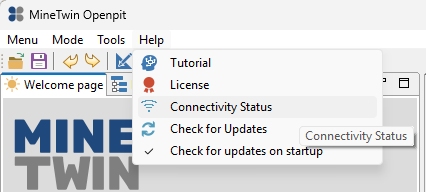
To check the connectivity status, select Help → Connectivity Status status menu item.
The following Connectivity Status dialog will open where the status of connection to all 3 servers will be shown.
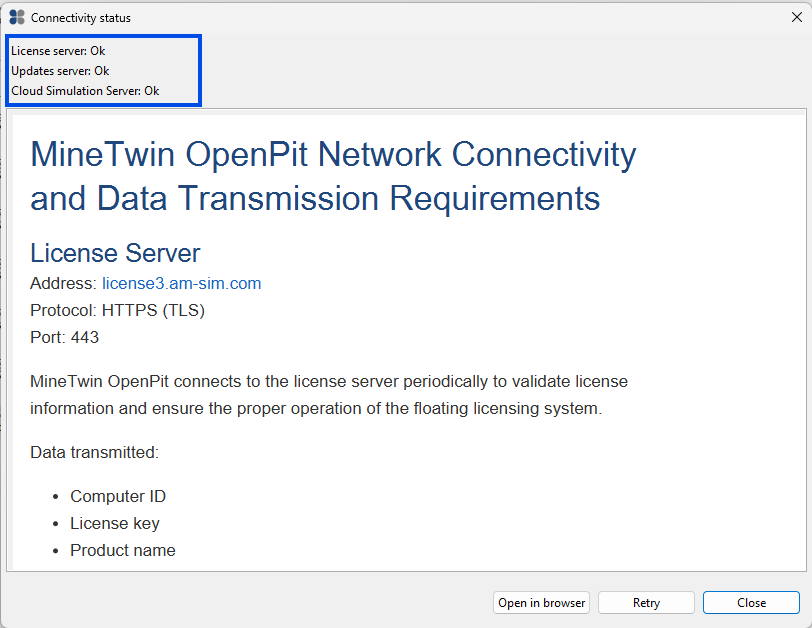
You can use Open in browser button of this dialog to copy this information and further use it for adjusting your firewall settings.